生活在别处 - 劲博客
从 Archive.org 恢复的 jin.im 旧 WordPress 博客静态归档。
很久没有用Xampp了,在地址栏输入localhost后却发现如下图的错误提醒 :
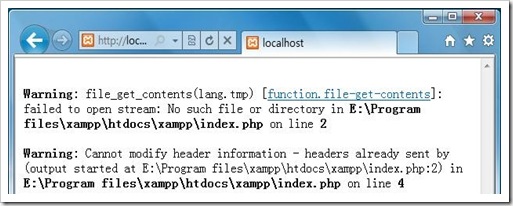
文字的完整内容是:
Warning: file_get_contents(lang.tmp) [function.file-get-contents]: failed to open stream: No such file or directory in E:\Program files\xampp\htdocs\xampp\index.php on line 2
Warning: Cannot modify header information – headers already sent by (output started at E:\Program files\xampp\htdocs\xampp\index.php:2) in E:\Program files\xampp\htdocs\xampp\index.php on line 4
看文字的意思是,无法找到lang.tmp这个文件。文件丢失的原因估计是被360或者QQ电脑管家当成临时文件给清除了。这个文件的作用是指定进入Xampp欢迎页面的默认语言。其实解决起来非常简单,打开Editplus,输入zh或en,然后保存成以.tmp为后缀,文件名为lang的文件,保存到xampp\htdocs\xampp下之后即可。
其实打开http://localhost/xampp的主要作用在于添加或管理数据库。直接打开http://localhost/phpmyadmin/可以实现同样的功能。
呵呵,不错,学习了。